What Support and SLAs Apply to My Instance?
Support and SLAs on Arino One depend entirely on whether your instance holds the Arino One plan (from $50/month): connected instances are supported directly by Arino against the severity targets below, while unconnected instances are self-supported with no Arino SLA at all. Every client owns and pays for their own provider accounts directly — Arino never holds client provider keys — so the connection determines support, not who holds the keys. Support runs from one European team across every region for the instances Arino does cover.
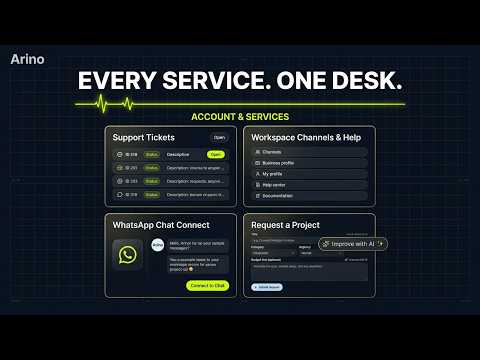
Ways to Get Help
| Channel | Who It Is For | What You Get |
|---|---|---|
| WhatsApp support line (+44 7860 089353) | Everyone, no login | Best-effort answers from a person |
| Public documentation | Everyone | Every published help article and guide |
| Support tickets in your instance | Connected instances | Tickets tied to your instance, with full history |
| Email (hello@arino.one) | Everyone | General questions and sales |
Connecting your instance also brings updates when Infobip, Meta or Viber change their rules, one-click activation for channels that need provider onboarding (Viber, RCS, voice, Messenger, Instagram, Telegram, LINE, KakaoTalk, Zalo, Apple Messages for Business), and support sessions you approve in the Command Inbox. To connect, see connecting your instance to Arino One; you can disconnect at any time.
Provider Support
Each provider bills you directly and supports its own network. Arino support will tell you whether a fault sits in the platform or with Infobip, Meta, Twilio, Brevo, LINK Mobility or another provider, and what to raise with them.
Severity and Response Targets
| Severity | Definition | First response |
|---|---|---|
| S1 | Production down; no messages sending or receiving | 1 hour, 24/7 |
| S2 | Major function degraded; workaround exists | 4 business hours |
| S3 | Minor defect or question | 1 business day |
| S4 | Feature request or advisory | 3 business days |
First response means acknowledgement and a named engineer, not full resolution — S1 incidents are worked continuously until service is restored, and you'll get regular updates rather than a single reply.
Raising a Ticket
Raise a ticket from Support in your instance, or by email to your named contact if your contract includes one. State the severity as you understand it; support will re-grade it if needed, but starting with your own assessment speeds up triage.
Escalating an Incident
Include five things: the instance name, the channel affected, the time window, an example message ID, and what you've already checked (webhook logs, Infobip status, a test send). That set typically removes a full round-trip from resolution time. If an S1 isn't acknowledged within its target, escalate through your named contact rather than opening a duplicate ticket.
Connected vs Unconnected
Support coverage is not uniform across instances — it follows whether the Arino One plan (from $50/month) is active.
| Status | Support model |
|---|---|
| Connected (Arino One plan from $50/month) | Full Arino support against the severity table above |
| Unconnected | Self-supported — public documentation and the free WhatsApp line, no Arino SLA or incident escalation path |
Connected instances sit under the Arino connection, so Arino's support team can see the instance's configuration and logs and work an incident directly against your own provider accounts. Unconnected instances are built and run entirely by the client on their own provider accounts, with no Arino connection to the instance at all — there is nothing for Arino support to see or act on. Clients on unconnected instances rely on the public documentation and the free WhatsApp line, and any incident response is entirely their own responsibility.
Maintenance and Status Updates
Planned maintenance that could affect message delivery is announced in advance via the status page and, where your contract includes a named contact, by direct email — this applies to connected instances. Unconnected instances run entirely on your own Infobip and Meta accounts with no Arino support, so any provider-side maintenance windows come from Meta or Infobip directly rather than from Arino. Subscribing to the status page is worthwhile regardless of connection status, since underlying WhatsApp, SMS and Infobip incidents can affect any instance.
What's Out of Scope for Support
Support covers the Arino One platform, its connections and configuration — it does not cover writing your automation logic from scratch, debugging custom code on a Remix front end, or acting as your first line of customer service. Arino support will confirm whether a fault sits in the platform (a webhook not firing, a message stuck in a queue) versus your own configuration or integration, and point you to the right resource either way.
If your instance is unconnected and you need SLA-backed support, the option is to add the Arino One plan (from $50/month), which brings your existing build under Arino's support, management, updates and WebRTC without changing your Infobip account.
Next Steps
Check whether your instance is connected if you're unsure, and see billing and plans for how support is priced relative to the platform subscription.
Frequently asked
What SLA Does Arino Offer?
A 1-hour, 24/7 first response for production-down (S1) incidents, with tiered targets down to 3 business days for feature requests. This applies to instances with the Arino One plan (from $50/month).
Is an Unconnected Instance Covered by an Arino SLA?
No. Unconnected instances are self-supported: they get the public documentation and the free, best-effort WhatsApp support line (+44 7860 089353), with no response-time commitment and no incident escalation path.
How Do I Raise a Ticket?
Open Support in your instance (the ticket form appears once you are connected to Arino One), or by email to your named contact if you have one. Include the instance name, channel, affected time window, an example message ID and what you've already checked.
Is There a Free Support Line?
Yes. Anyone can message +44 7860 089353 on WhatsApp, with no login. It is answered by a person on a best-effort basis.
Does Support Ever See My Messages or Keys?
No. Connected or not, your instance never sends Arino One your messages, contacts, conversations, media, API keys or business data.
Does Support Cost Extra?
Support is included as part of the Arino One plan (from $50/month); it is not a separate line item. Unconnected instances have no Arino billing relationship and no included support.
Can I Escalate Outside Business Hours?
Only S1 incidents carry a 24/7 response commitment. S2–S4 are handled within business hours, and escalation follows the same ticket, marked urgent by your named contact if you have one.
What Should I Include When Reporting an Incident?
Instance name, channel affected, the time window, an example message ID, and the checks you've already run. Those five items typically remove a full round-trip from resolution time.
Apply this to your own deployment
This guide describes decisions we make on live platforms. Tell us your channels, systems and region and we will map it to an architecture outline, a provisioning plan and an indicative commercial model — usually within one business day.